
Quick answer: Before connecting rent payments to property or accounting software, identify the legal entities involved, confirm their responsibilities and map the data each system needs. During the build, restrict credentials, verify incoming events and make retries safe. Test failures as well as successful payments. After launch, reconcile against confirmed receipts, investigate returns and review access regularly.
Connecting a rent payment platform such as TenantPay to property management or accounting software can reduce manual ledger work. It also creates new data flows, credentials and failure cases. A payment may be started in one system, reported as pending in another and later returned by the bank. The integration needs a clear way to handle each state without exposing tenant information or collecting the same payment twice.
This checklist is for Canadian property managers and software teams planning that connection. Use it alongside the provider’s current technical documentation, contractual terms and advice on the laws that apply to your organisation.
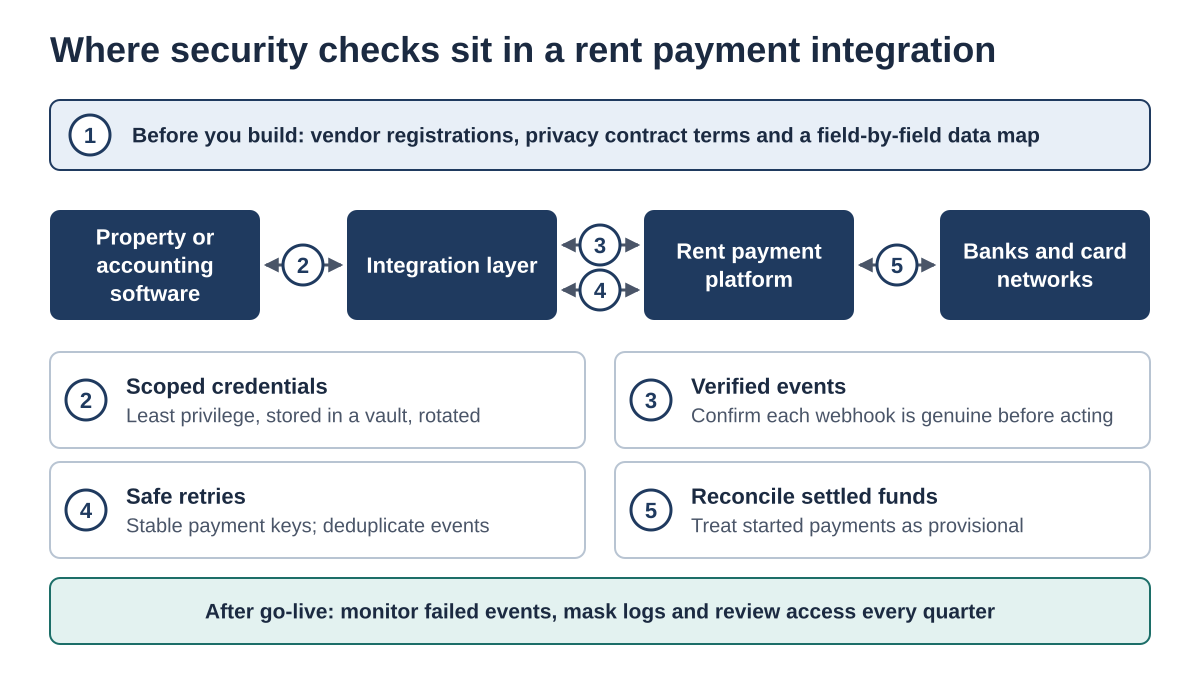
Security checks across the systems involved in a rent payment integration.
Before you build
Confirm the entities and registrations
Ask which legal entities provide the service and which registrations apply to their activities. Check those names in the relevant FINTRAC registry and Bank of Canada registry, where applicable. Registration is not an endorsement or a licence from either body. If card payments are involved, use the PCI DSS requirements and your payment arrangements to establish which security and validation responsibilities each party retains.
Agree privacy responsibilities in writing
Outsourcing processing does not automatically transfer privacy accountability. The OPC’s cross-border processing guidance explains the need for comparable protection through contractual or other means under PIPEDA. Where Quebec’s private-sector privacy act applies, section 17 requires a privacy impact assessment before personal information is communicated outside Quebec, and a written agreement that takes the assessment into account. Confirm the applicable law, processing locations, subprocessors, incident responsibilities and deletion arrangements before sending production data.
Map the data that must move
Record each field, its purpose, its direction of travel and who can access it. Payment references, amounts and status updates may need to reach the ledger; raw bank details or identity documents may not. Use tokens or references where the provider supports them. Document how corrections, account changes and deletion requests reach every system holding the information.
During the build
Use the OWASP API Security Top 10 to structure the technical review. The following examples show how several of its risks can arise in a rent payment connection.
|
Risk area |
How it can appear in a rent integration |
Check |
|---|---|---|
|
Broken object level authorization |
One landlord’s credentials can read another landlord’s tenants |
Confirm every request is scoped to the right account |
|
Broken authentication |
Long-lived keys pasted into scripts |
Store secrets in a vault and rotate them |
|
Security misconfiguration |
Test settings left switched on in production |
Review configuration before go-live |
|
Improper inventory management |
Forgotten test endpoints or old API versions |
Keep a list of every connection and retire unused ones |
|
Unsafe consumption of APIs |
Trusting vendor data without checks |
Validate payloads before posting to the ledger |
Restrict credentials and permissions
Give the integration only the access needed for its job. Ask whether a ledger-sync credential can be kept separate from permissions to change payout details. Use different credentials for test and production, store secrets outside source code and browser scripts, and agree how keys are revoked and rotated. Record an owner for every credential.
Verify webhook events
Follow the provider’s documented verification process before acting on an event. If signatures are supported, verify them as specified, including the timestamp and raw request body where required. If they are not, agree another authenticated delivery method with the provider. Reject or quarantine unverifiable messages, and alert on repeated failures without logging secrets or unnecessary tenant details.
Make retries safe
A timeout does not establish that a payment failed. Use the provider’s supported idempotency mechanism, with a stable identifier for the same intended payment, and check the existing result before retrying an uncertain request. Separately record webhook event IDs and make ledger updates safe to repeat. Deduplicating a notification does not by itself prevent a second payment from being created.
Test unsuccessful and repeated events
In a sandbox, test successful payments, insufficient funds, cancellations, partial amounts, duplicate notifications and events arriving out of order. Confirm that a returned payment reverses the appropriate ledger entry. Payments Canada’s PAD guidance allows an NSF PAD to be retried once within 30 days of the original transaction, for the identical amount and without adding the business’s fees. Apply the relevant rules and provider instructions rather than automatically retrying every failure reason.
At launch
Agree what initiated, pending, settled and returned mean for each payment method. Payments Canada’s retail batch system is one part of the Canadian payment infrastructure; a provider’s processing status is not a universal promise about when funds will be available in your bank account. Reconcile provider records with actual receipts, and account for returns or adjustments that arrive later. Compare the new records with the existing ledger for a complete rent cycle while keeping only one active collection path for each intended payment.
After launch
- Alert on failed event deliveries, authentication errors, delayed updates and unmatched receipts.
- Review integration access on a defined schedule, such as quarterly, and immediately when staff, providers or roles change.
- Read release notes and update the data map when an endpoint, field or processing arrangement changes.
- Keep named incident contacts and agree how each organisation reports and investigates a problem.
Treat logs as another store of personal information. Mask tokens and account details, restrict access and keep identifiers instead of full payloads wherever possible. The OPC’s retention guidance recommends documented retention and disposal schedules that account for purpose and legal requirements. Include integration logs in that schedule rather than keeping debug data indefinitely.
Check the platform against the integration plan
TenantPay’s PropTech API is one example to assess against these requirements. Its public overview describes a REST API, sandbox access and real-time webhook events, with options to embed rent payments, rewards and credit reporting. Confirm which capabilities are available under your agreement, how events are authenticated and which permissions are supported. Test the actual configuration before relying on a general product description.
Complete the checks before expanding
A useful launch review should explain who handles the money and data, how events are verified, how uncertain payments are investigated and who owns each exception. Keep a record of the tests and operating responsibilities. When the integration changes, repeat the relevant checks instead of assuming the original approval covers the new setup.
Frequently asked questions
Why does idempotency matter for rent payments
It helps make repeated requests for the same intended payment safe when the provider supports it. Keep a stable payment identifier, follow the documented retry rules and check uncertain outcomes. Webhook deduplication is a separate control for repeated notifications.
Does a payment provider take over our privacy responsibilities
Not automatically. Under PIPEDA, an organisation remains accountable for personal information transferred for processing and must provide comparable protection through contractual or other means. Confirm which federal or provincial law applies to your activity.
When is a Quebec privacy impact assessment needed
The applicable law depends on the organisation and the activity. For organisations subject to Quebec’s private-sector act, section 17 requires an assessment before personal information is communicated outside Quebec. Other assessment duties may also apply. Confirm the requirements before the data transfer.
What should a sandbox test include
Include normal payments, returns, cancellations, partial amounts, repeated requests and notifications arriving in the wrong order. Check that failures do not leave a tenant marked as paid, and that retrying a request does not collect the same payment twice.
When should integration access be reviewed
Review it on a recorded schedule and whenever a person, provider or permission changes. Revoke unused keys and confirm that former users cannot reach either the integration or its logs.

