
How Digital Quote Workflows Reduce LTL Freight Booking Errors
Quick Answer: Digital quote workflows reduce LTL booking errors by capturing shipment data once, in required and validated fields, and reusing that same record for the quote, the booking and the shipping documents. Fewer manual handoffs mean fewer chances to mistype a weight, confuse centimetres with inches, forget a tailgate or send a driver to a site that cannot receive the freight.
A less-than-truckload (LTL) booking looks like one task, but it is really a chain of handoffs. Someone in sales promises a delivery date. Someone in the warehouse measures the pallet and writes the numbers down. Someone else types them into an email to a carrier, then types them again into the bill of lading, then prints labels. Every copy of the same information is another chance to change it by accident.
The cost of those small errors arrives later: a re-measurement charge, a driver who cannot unload at a site without a dock, a redelivery fee, or a customer who waits an extra day. This guide maps where booking errors usually enter and explains how a digital quote workflow is designed to stop them.
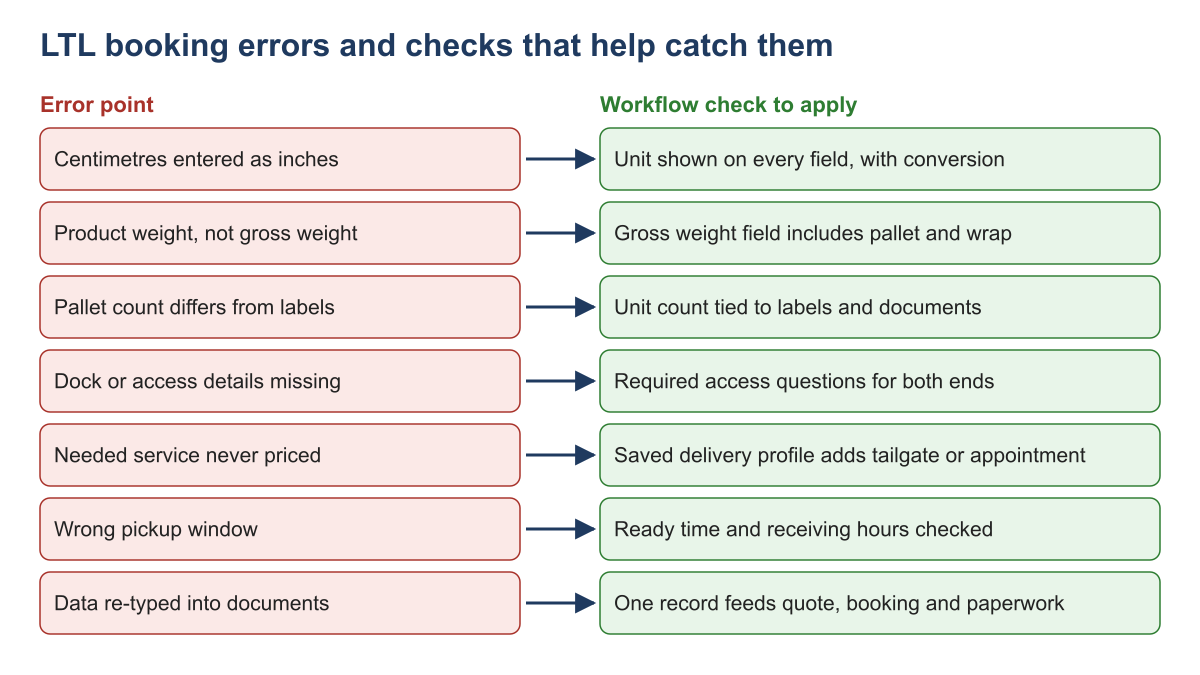
Common LTL booking errors and workflow checks that help catch them before pickup.
Where Do Freight Booking Errors Come From?
Re-keying the same data
When dimensions and weights are typed into three or four different places, the versions drift apart. A pallet that is 52 inches tall on the warehouse note can become 25 inches in an email, and nobody notices until the carrier measures it.
Unit mix-ups
Canadian businesses work in both metric and imperial units, and freight pricing is sensitive to both. Illustrative example (hypothetical pallet): a unit measuring 120 by 100 by 120 centimetres occupies 1.44 cubic metres, or about 50.9 cubic feet. If those same numbers are entered as inches, the system sees 1,440,000 cubic inches, about 833.3 cubic feet, which is roughly 16.4 times the real volume. A weight entered as 400 pounds when the scale read 400 kilograms understates the freight by more than half, since 400 kilograms is about 882 pounds.
Net weight instead of gross weight
Use the gross weight of everything shipped: product, container, packaging and pallet. Omitting the pallet can change the billable weight or the carrier’s rating calculation, so record the final loaded unit rather than relying on product specifications alone.
Missing access details
Dock availability, fixed receiving hours and appointment requirements all change both the price and the truck that is sent. These details are easy to skip in an email because the sender knows the customer and forgets the carrier does not.
Count and description mismatches
If the booking says three pallets and the dock holds four, or labels do not match the paperwork, freight can be delayed or separated. In Quebec, the transport ministry notes that the shipper must ensure each item covered by the bill of lading is clearly and distinctly identified.
How Does a Digital Workflow Catch These Errors?
A well-designed quote workflow does not rely on people being more careful. It changes the process so that common mistakes become hard to make.
Required fields with explicit units
Every quote request asks for the same information in the same order, and each measurement field states its unit. Some tools let you choose metric or imperial and convert automatically, which removes the guesswork from mixed-unit teams.
Plausibility checks
Software can flag numbers that do not make sense together. A pallet that would weigh less than a few pounds per cubic foot, or a height taller than typical trailer equipment, deserves a second look before the request goes out. A correctly configured density check could flag the centimetre and inch mix-up described above, because the mistyped pallet would suddenly appear about 16 times less dense than the real one.
Saved location profiles
Once a customer’s dock status, receiving hours and appointment rules are stored, they can be reused on later bookings to that address, after checking that the site details are still current. The knowledge stops living in one person’s head.
One record for quote, booking and paperwork
When the accepted quote feeds the booking and the shipping documents directly, nobody re-types the weight. The figures the carrier priced are the figures the driver sees.
Status and messages attached to the shipment
Pickup confirmations, delivery updates and messages with the carrier sit on the shipment record instead of scattered inboxes. When something changes, authorized team members can review the updated record, subject to the platform’s permissions and notifications.
A Pre-Booking Checklist
Even with good software, a quick review before you submit is worth the minute it takes.
|
Check |
Error it helps catch |
|---|---|
|
Units confirmed for every dimension and weight |
Volume or weight off by a large factor |
|
Gross weight includes pallet and packaging |
Reweigh adjustment after pickup |
|
Handling unit count matches labels |
Missing or split freight |
|
Dimensions taken at the widest points |
Re-measurement charge |
|
Dock, hours and appointment answered for both ends |
Failed pickup or delivery |
|
Non-stackable, fragile or regulated goods flagged |
Wrong handling or refused freight |
What a Workflow Cannot Fix
Software cannot measure your pallet or confirm that it was built the way the booking describes. Carriers can still inspect and re-measure, and any resulting invoice adjustment should be supported by the applicable terms and inspection evidence. Review errors through the carrier’s dispute process. Dangerous goods also sit outside any quote form shortcut: they must be disclosed and handled under Canada’s transportation of dangerous goods rules, with the carrier’s agreement secured in advance.
Service availability is another point to confirm each time. A lane that one carrier serves directly may be handed to a partner by another, and not every carrier offers every accessorial at every location.
Putting the Workflow Into Practice
For shippers in Quebec and Ontario, Truxweb is an example of a digital quote workflow in use. Shipment details are entered once to request quotes from several carriers, the chosen quote is booked from the same record, and automated email alerts follow the shipment at dispatch, pickup and delivery. The platform also lets shippers message the carrier’s dispatch team directly, which keeps changes tied to the booking rather than lost in a phone call.
Conclusion
Some LTL booking errors start as small differences between what was measured, what was typed and what the receiver can handle. A digital quote workflow reduces them by asking for complete data once, checking it, and reusing it everywhere. Pair that structure with careful measuring and honest access details, and invoices start to look like the quotes that preceded them.
Frequently Asked Questions
Which booking errors are the most expensive to fix?
Errors discovered at the dock or at delivery tend to cost the most, because they can trigger re-measurement charges, failed deliveries, redelivery fees and storage. Correcting details before booking can avoid later charges. Check amendment or cancellation fees if a booking has already been accepted.
Can I change a booking after the freight is picked up?
Some details can be corrected, but the carrier will rely on what it measures and observes. Contact the carrier or platform as soon as you spot an error, and keep a record of the change.
Do I still need a bill of lading with a digital booking?
Yes. A bill of lading records the contract of carriage. In Quebec, the carrier must produce one for road transport of goods for others, and the shipper may produce a compliant short form if the carrier agrees.
How do I stop centimetre and inch mix-ups?
Pick one unit system for each booking, use a tool that labels every field with its unit, and compare the calculated volume with what the pallet looks like before you submit.

